DynamoDB Single-Table Pattern: Social Media Feed
The social feed is the schema design problem that separates DynamoDB practitioners from beginners. It looks simple - show a user the recent posts from people they follow - but hiding behind that sentence are two competing architectural decisions that each have real consequences.
Get it right and your feed loads in under 10ms at any scale. Get it wrong and you’re either paying enormous write costs or building a fan-out-on-read merge that bogs down under moderately popular accounts.
This pattern covers both approaches, the tradeoffs honestly, and the schema I’d use in production.
The core problem
Building a social feed requires answering one question: at what point in time do you do the work?
Fan-out on write: When Alice posts, immediately write a copy of that post into the feed of every one of her followers. Feed reads are a single query. Writes are amplified by follower count.
Fan-out on read: When Bob wants to see his feed, query who he follows, then query each person’s recent posts, then merge and sort. No write amplification. Reads are expensive and slow for users with many followees.
Neither is universally correct. The right choice depends on your follower distribution.
Access patterns
| # | Access Pattern | Operation | Notes |
|---|---|---|---|
| AP1 | Get home feed for user (newest first) | Query | Core product - must be fast |
| AP2 | Get all posts by a user (profile page) | Query | Author’s own posts, newest first |
| AP3 | Get a specific post | GetItem | Permalink, share link |
| AP4 | Get users this user follows | Query | Following list |
| AP5 | Get followers of a user | Query (GSI1) | Follower list, fan-out source |
| AP6 | Check if user A follows user B | GetItem | Follow button state |
Six access patterns. Four entity types. One GSI. The fan-out mechanism lives in application code, not the schema.
Entities
- User: profile data, counters denormalized for performance
- Follow: edge between follower and followee (adjacency list)
- Post: the content item, lives in the author’s partition
- FeedItem: a denormalized copy of a post, written into the reader’s feed partition
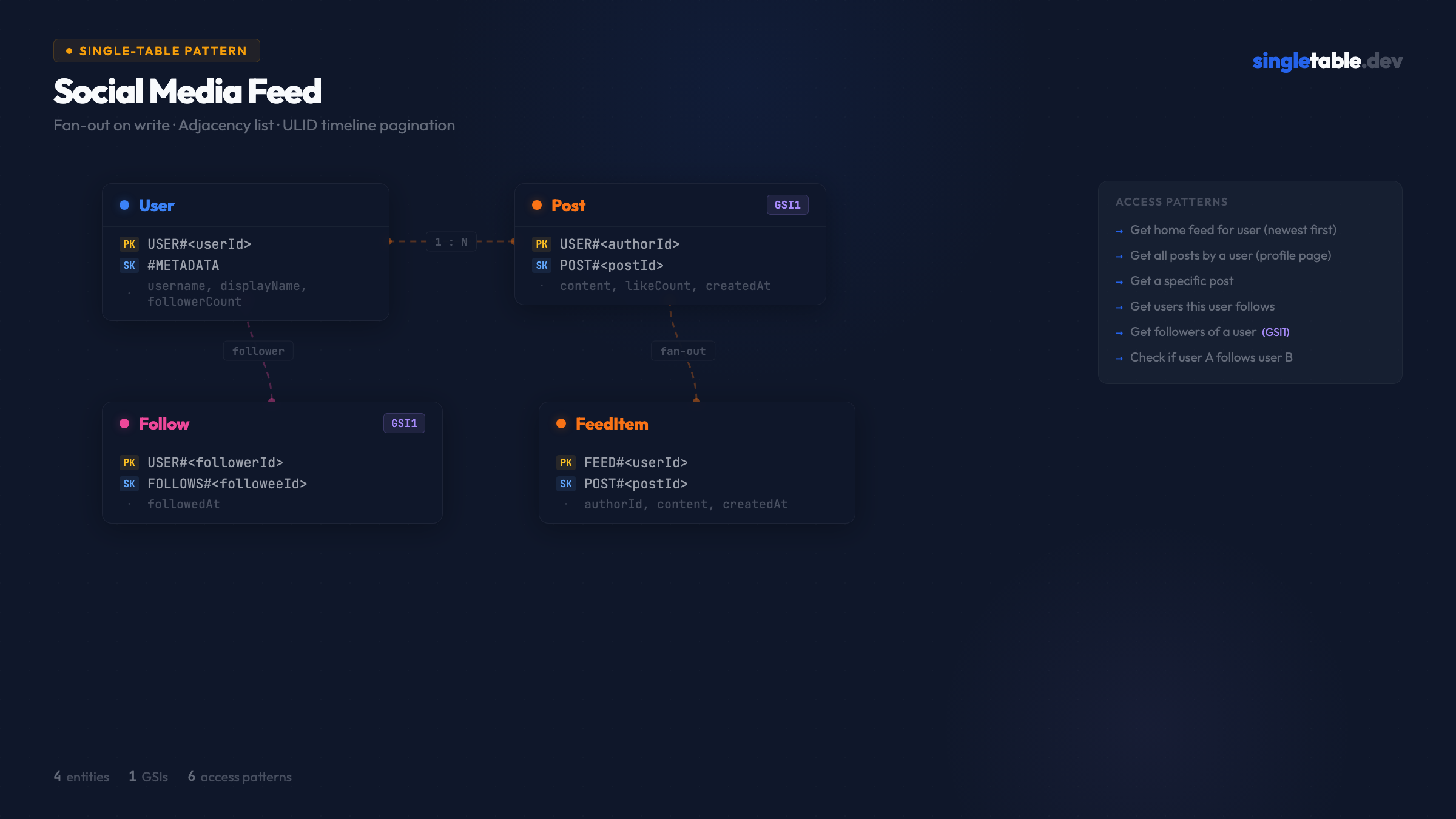
Table design
Primary key structure
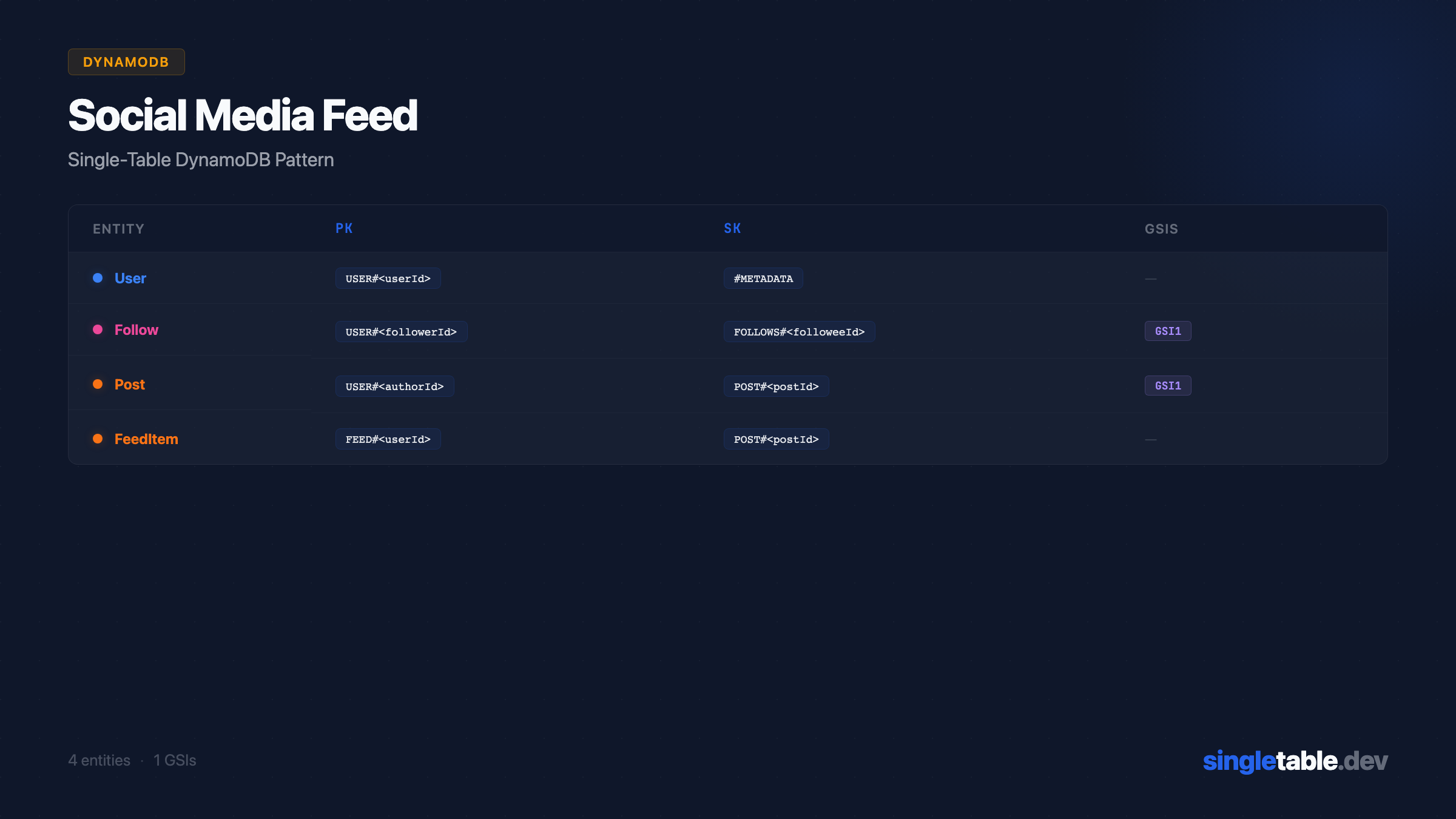
| Entity | PK | SK | Purpose |
|---|---|---|---|
| User | USER#<userId> | #METADATA | User profile |
| Post | USER#<authorId> | POST#<postId> | Posts in author’s partition |
| Follow | USER#<followerId> | FOLLOWS#<followeeId> | Following edges |
| FeedItem | FEED#<userId> | POST#<postId> | Pre-computed home feed |
The key insight: User, Post, and Follow all share USER#<userId> as their partition key. A single Query on USER#<id> with different SK prefixes retrieves the user profile, their posts, and their following list from the same partition.
FeedItem uses a separate FEED#<userId> partition to keep feed reads from competing with profile reads. At high traffic, the feed partition will be read far more frequently than the user partition - keeping them separate prevents hot-key issues.
ULIDs for post IDs. POST#<ulid> as the sort key gives chronological ordering within each partition - newest posts sort last, so ScanIndexForward=false gives newest-first with no extra work. The ULID is also the post’s globally unique ID, so AP3 (get post by ID) resolves to GetItem once you know the authorId. (Full comparison: ULIDs vs UUIDs vs Timestamps for DynamoDB Sort Keys.)
GSI design
| GSI | PK | SK | Purpose |
|---|---|---|---|
| GSI1 | FOLLOWEDBY#<followeeId> | USER#<followerId> | Get followers of a user |
One GSI covers AP5 (follower list) and is also the source for fan-out - when Alice posts, query GSI1 for all of Alice’s followers, then write FeedItems into each follower’s FEED#<id> partition.
Sample data
| pk | sk | gsi1pk | gsi1sk | Entity Data |
|---|---|---|---|---|
USER#alice | #METADATA | - | - | { username: "alice", followerCount: 1420 } |
USER#alice | POST#01HVMK3P2Q... | - | - | { content: "Building in public...", likeCount: 23 } |
USER#alice | POST#01HVNR4Q3R... | - | - | { content: "DynamoDB tip:", likeCount: 87 } |
USER#bob | FOLLOWS#alice | FOLLOWEDBY#alice | USER#bob | { followedAt: "2026-01-15T..." } |
USER#carol | FOLLOWS#alice | FOLLOWEDBY#alice | USER#carol | { followedAt: "2026-02-01T..." } |
FEED#bob | POST#01HVNR4Q3R... | - | - | { authorId: "alice", content: "DynamoDB tip:", likeCount: 87 } |
FEED#carol | POST#01HVNR4Q3R... | - | - | { authorId: "alice", content: "DynamoDB tip:", likeCount: 87 } |
When Alice publishes POST#01HVNR4Q3R, the fan-out Lambda writes a FeedItem into Bob’s feed and Carol’s feed. Both FeedItems are independent copies - Bob can delete or mute his without affecting Carol’s.
Resolving each access pattern
AP1 - Get home feed, newest first:
Query(pk=FEED#bob, ScanIndexForward=false, limit=20)One query. Returns the pre-written FeedItems in reverse ULID order (newest first). This is the primary benefit of fan-out on write - feed reads are always a single query.
AP2 - Get all posts by a user (profile page):
Query(pk=USER#alice, sk begins_with POST#, ScanIndexForward=false)One query. Returns Alice’s posts newest-first from her partition.
AP3 - Get a specific post:
GetItem(pk=USER#alice, sk=POST#01HVNR4Q3R)One read, O(1). Requires knowing authorId - store it in your URL scheme (/posts/<authorId>/<postId>) or in the FeedItem so you can construct the key.
AP4 - Get users this user follows:
Query(pk=USER#bob, sk begins_with FOLLOWS#)One query. Returns all Follow edges from Bob’s partition.
AP5 - Get followers of a user:
Query(GSI1, gsi1pk=FOLLOWEDBY#alice)One query on GSI1. Returns all users who follow Alice - this is also the source for fan-out.
AP6 - Check if user A follows user B:
GetItem(pk=USER#bob, sk=FOLLOWS#alice)One read. Returns the Follow record if it exists, 404 if not. Use this to render the follow/unfollow button state.
The fan-out implementation
The fan-out is where this pattern’s operational logic lives. Here’s the Lambda triggered by DynamoDB Streams on a new Post:
import { DynamoDBStreamHandler } from 'aws-lambda';
import { unmarshall } from '@aws-sdk/util-dynamodb';
import { FeedItemEntity, FollowEntity } from './entities';

const BATCH_SIZE = 25; // DynamoDB TransactWriteItems limit

export const handler: DynamoDBStreamHandler = async (event) => {
  for (const record of event.Records) {
    if (record.eventName !== 'INSERT') continue;

    const newItem = unmarshall(record.dynamodb!.NewImage! as any);

    // Only process Post insertions
    if (!newItem.sk?.startsWith('POST#')) continue;

    const { authorId, postId, content, mediaUrls, likeCount, createdAt } = newItem;

    // Get all followers via GSI1 pagination
    let cursor: string | undefined;
    do {
      const { data: followers, cursor: nextCursor } = await FollowEntity.query
        .byFollowee({ followeeId: authorId })
        .go({ cursor, limit: 100 });

      cursor = nextCursor;

      // Write FeedItems in batches of 25
      for (let i = 0; i < followers.length; i += BATCH_SIZE) {
        const batch = followers.slice(i, i + BATCH_SIZE);

        await Promise.all(
          batch.map(follow =>
            FeedItemEntity.put({
              userId: follow.followerId,
              postId,
              authorId,
              content,
              mediaUrls,
              likeCount,
              createdAt,
            }).go()
          )
        );
      }
    } while (cursor);
  }
};
Feed item TTL. Add a ttl attribute to FeedItem and set it to 90 days. DynamoDB will automatically delete old feed items, keeping feed partitions from growing indefinitely. Users rarely scroll back more than a week anyway. TTL is one of the highest-impact DynamoDB cost optimization techniques - auto-deletion has no write cost.
// In FeedItemEntity attributes
ttl: {
  type: "number",
  required: true,
  default: () => Math.floor(Date.now() / 1000) + (90 * 24 * 60 * 60), // 90 days
  readOnly: true,
},
Enable TTL on the table:
aws dynamodb update-time-to-live \
  --table-name MainTable \
  --time-to-live-specification Enabled=true,AttributeName=ttl
Fan-out on write vs fan-out on read
This schema uses fan-out on write. Here’s the tradeoff in full:
Fan-out on write (this schema)
On post creation, write a FeedItem into every follower’s FEED#<id> partition. Feed reads are a single Query - always O(1) regardless of how many people you follow. The cost is write amplification: Alice with 1,420 followers costs 1,420 writes per post; a celebrity with 1M followers costs 1M writes. Works well when most users have moderate follower counts (< 10K) and your read:write ratio heavily favors reads (it almost always does for feeds). Breaks when you have high-follower accounts - the fan-out Lambda for a 1M-follower user takes minutes and may timeout or hit Lambda concurrency limits.
Fan-out on read (alternative)
Don’t write FeedItems. When Bob wants his feed, query AP4 to get everyone Bob follows, then batch-query AP2 for each person’s recent posts, then merge and sort client-side. Read cost is one query per followee plus merge - if Bob follows 300 people, that’s up to 300 parallel queries per feed load. Write cost is one write per post with no amplification. Works for low-volume social apps. Breaks when Bob follows 500 people and your feed needs to load in under 200ms.
The practical recommendation
Start with fan-out on write for the simpler read path. Handle celebrity accounts separately:
const CELEBRITY_THRESHOLD = 10_000; // followers

// In the fan-out Lambda
if (author.followerCount > CELEBRITY_THRESHOLD) {
  // Don't fan-out. Mark the author as "celebrity" in the User record.
  // On feed read: merge fan-out items with a real-time query of celebrity posts.
  return;
}

// Normal fan-out for regular users
On feed read, mix pre-computed fan-out items with real-time celebrity post queries:
async function getHomeFeed(userId: string) {
  const [fanoutItems, followedCelebrities] = await Promise.all([
    // Pre-computed fan-out feed
    FeedItemEntity.query.primary({ userId })
      .go({ order: 'desc', limit: 50 }),

    // Get celebrities this user follows
    getCelebrityFollowees(userId),
  ]);

  // Real-time query for each celebrity's recent posts
  const celebrityPosts = await Promise.all(
    followedCelebrities.map(celeb =>
      PostEntity.query.primary({ authorId: celeb.followeeId })
        .go({ order: 'desc', limit: 10 })
    )
  );

  // Merge and sort by postId (ULID = chronological)
  return [...fanoutItems.data, ...celebrityPosts.flatMap(r => r.data)]
    .sort((a, b) => b.postId.localeCompare(a.postId))
    .slice(0, 20);
}
This hybrid approach (Twitter’s actual architecture, roughly) gives you fast reads for most users and avoids catastrophic write amplification for high-follower accounts.
ElectroDB entity definitions
export const UserEntity = new Entity({
  model: { entity: "user", version: "1", service: "social" },
  attributes: {
    userId:        { type: "string", required: true },
    username:      { type: "string", required: true },
    displayName:   { type: "string", required: true },
    bio:           { type: "string" },
    followerCount: { type: "number", required: true, default: 0 },
    followingCount: { type: "number", required: true, default: 0 },
    postCount:     { type: "number", required: true, default: 0 },
    createdAt: {
      type: "string",
      required: true,
      default: () => new Date().toISOString(),
      readOnly: true,
    },
    updatedAt: {
      type: "string",
      required: true,
      default: () => new Date().toISOString(),
      set: () => new Date().toISOString(),
      watch: "*",
    },
  },
  indexes: {
    primary: {
      pk: { field: "pk", composite: ["userId"],   template: "USER#${userId}" },
      sk: { field: "sk", composite: [],           template: "#METADATA" },
    },
  },
}, { client, table });Why this design
FeedItems store the full content, not a reference. Feed reads never need a second lookup - the same tradeoff the Chat/Messaging pattern makes by denormalizing the last message onto the conversation record. If Alice edits a post, the FeedItems don’t automatically update. For most social apps, edit propagation to feeds isn’t required (and if it is, you can use DynamoDB Streams to propagate updates the same way you fan-out new posts).
followerCount and postCount live directly on the User record and update atomically with UpdateExpression: 'ADD followerCount :one'. Computing them at read time would require counting Follow records, which doesn’t scale. Denormalized counters are standard practice in DynamoDB.
The Follow entity also serves as the fan-out source. GSI1’s FOLLOWEDBY#<followeeId> partition collects all followers of a user - the exact list the fan-out Lambda needs. No separate data structure required.
What’s not covered here:
- Like and reply entities (same pattern as Post - live in author’s partition, fan-out via Streams if needed)
- Notifications (separate pattern - subscriber model, not feed model)
- Block/mute (filter at read time using a Block entity in the user’s partition)
- Hashtag/search (delegate to Elasticsearch or OpenSearch - DynamoDB doesn’t do text search)
Design this visually → coming soon
Fan-out on write vs fan-out on read is a tradeoff that’s genuinely hard to reason about in the abstract. On a canvas where you can see the write amplification - one post → 1,420 FeedItem writes for Alice’s followers - the cost is tangible before you’ve committed to it. That’s what I’m building at singletable.dev.
Pattern #3 of 10 in the SingleTable pattern library. I’m building singletable.dev to make fan-out tradeoffs and schema decisions visual - so you see the write amplification cost before you commit to a design.