DynamoDB Single-Table Pattern: E-Commerce Orders
Orders have a lifecycle (pending → confirmed → shipped → delivered). They belong to customers. They contain multiple items. And they need to be queryable from several directions: by customer, by status, by order ID.
Get the schema wrong and you’ll be doing table scans or making multiple round trips for simple operations. Get it right and every access pattern resolves to a single query. This is the schema I’d use in production. (Still deciding between DynamoDB and Postgres for your e-commerce backend? The comparison post covers the tradeoffs honestly.)
Access patterns
Before touching the key structure, list every access pattern the application needs. This is the most important step in single-table design.
| # | Access Pattern | Operation | Notes |
|---|---|---|---|
| AP1 | Get order by ID | GetItem | Customer service, order confirmation |
| AP2 | Get all orders for a customer (newest first) | Query | Customer order history |
| AP3 | Get orders by status | Query (GSI1) | Ops dashboard - “show me all pending orders” |
| AP4 | Get all items in an order | Query | Order detail page |
| AP5 | Get a specific item in an order | GetItem | Item-level operations |
| AP6 | Get customer profile | GetItem | Account page |
| AP7 | Get recent orders across all customers (admin) | Query (GSI1) | Admin dashboard |
| AP8 | Get orders placed in a date range | Query (GSI1) | Reporting |
Eight access patterns. Three entity types: Customer, Order, OrderItem. One table, one GSI. The queries this schema intentionally doesn’t support are covered in what queries your DynamoDB schema explicitly doesn’t support.
Entities
This schema has three entities sharing a single table:
- Customer: the buyer account
- Order: belongs to a customer, has a lifecycle status
- OrderItem: a product line within an order
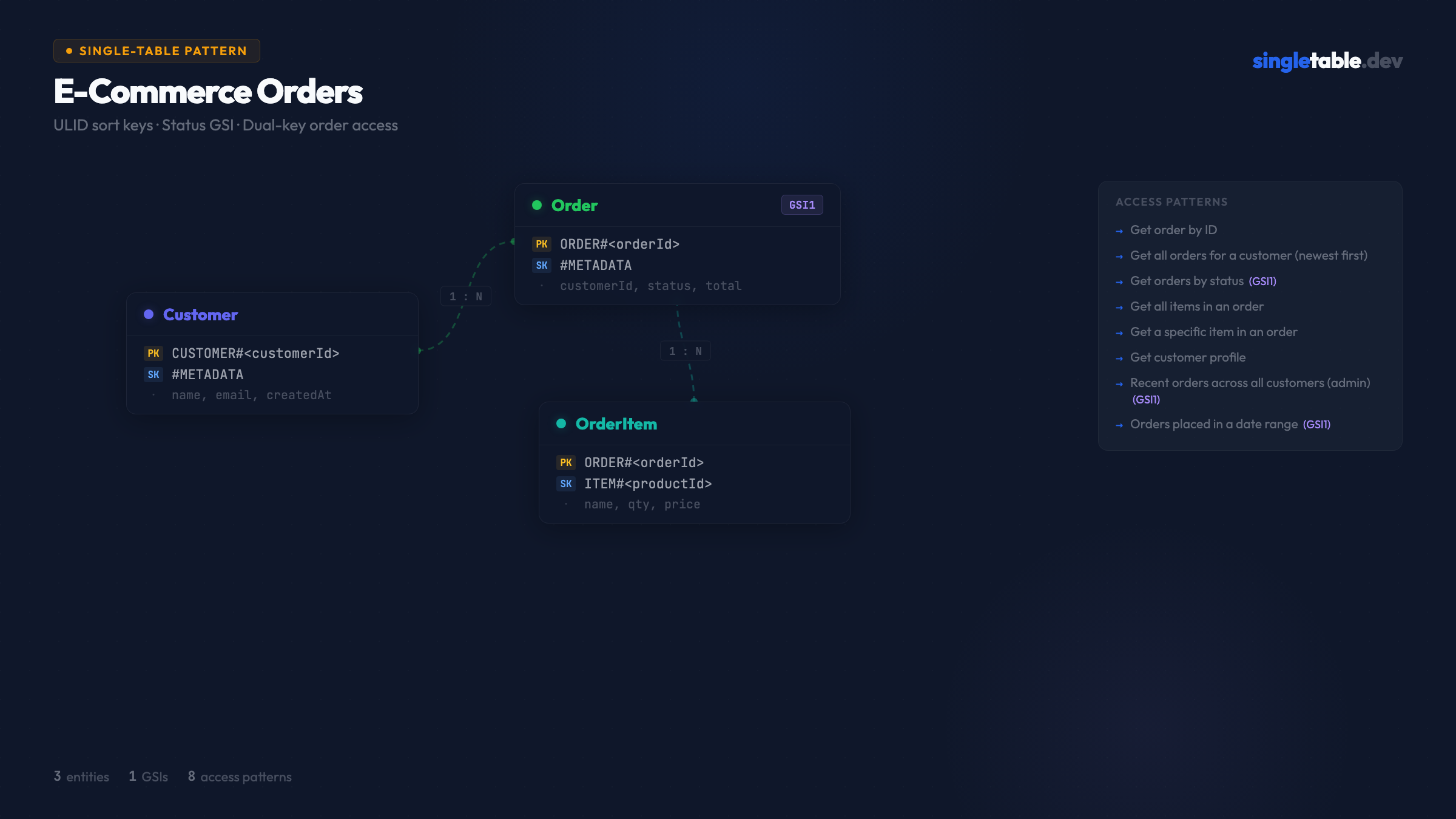
Table design
Primary key structure
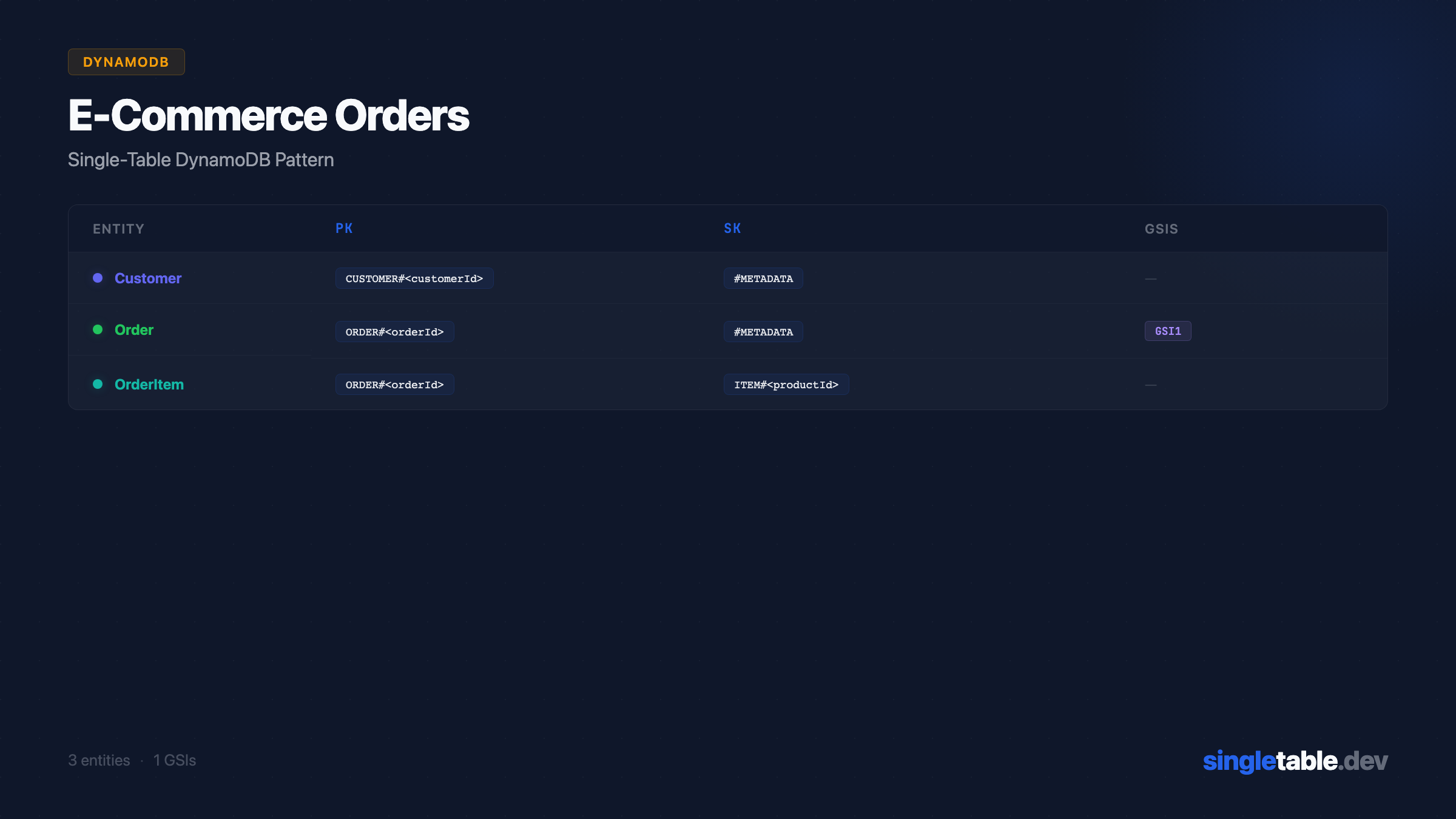
| Entity | PK | SK | Purpose |
|---|---|---|---|
| Customer | CUSTOMER#<customerId> | #METADATA | Customer profile |
| Order (direct) | ORDER#<orderId> | #METADATA | Direct order lookup by ID |
| Order (customer copy) | CUSTOMER#<customerId> | ORDER#<orderId> | Orders by customer, newest first |
| OrderItem | ORDER#<orderId> | ITEM#<productId> | Items within an order |
Orders appear twice. The CUSTOMER#<id> / ORDER#<ulid> record serves AP2 (get all orders for a customer). The ORDER#<id> / #METADATA record serves AP1 (get order by ID). This costs two write units per order but means both access patterns are O(1) queries. The full tradeoff analysis is in When order duplication is and isn’t acceptable.
Can we do it with one record? Yes - with a tradeoff. If you put the order under CUSTOMER#<id> as PK, you can’t GetItem by orderId without knowing the customerId. In most web apps the customer is always in session context, so one record works fine. If you need to look up orders by orderId alone - webhooks, customer service tools - you need the second record.
ULIDs for Order IDs. The ORDER#<ulid> sort key gives chronological ordering within a customer’s partition (AP2) AND direct lookup by order ID (AP1) - because the ULID is the order ID. No timestamp prefix needed. See ULIDs vs UUIDs vs Timestamps for the full explanation.
GSI design
| GSI | PK | SK | Purpose |
|---|---|---|---|
| GSI1 | STATUS#<status> | ORDER#<orderId> | Orders by status, newest-first within each status |
One GSI serves three access patterns. AP3 (orders by status), AP7 (recent orders across all customers), and AP8 (orders in a date range) all resolve to GSI1 queries. The ULID sort key does the heavy lifting: it’s both a unique ID and a chronological sort key, so time-range queries are just ULID prefix range queries.
Only the ORDER#<id> / #METADATA record writes to GSI1 - not the customer-partition copy. This avoids double-charging GSI write costs. The customer-partition copy exists purely for AP2.
Sample data
Here’s what the table looks like with real data:
| pk | sk | gsi1pk | gsi1sk | Entity Data |
|---|---|---|---|---|
CUSTOMER#cust_01 | #METADATA | - | - | { name: "Alice Chen", email: "alice@example.com" } |
CUSTOMER#cust_01 | ORDER#01HVMK3P2Q... | - | - | { orderId: "01HVMK...", status: "delivered", total: 94.96 } |
CUSTOMER#cust_01 | ORDER#01HVNR4Q3R... | - | - | { orderId: "01HVNR...", status: "pending", total: 29.99 } |
ORDER#01HVNR4Q3R | #METADATA | STATUS#pending | ORDER#01HVNR4Q3R... | { customerId: "cust_01", total: 29.99, createdAt: "..." } |
ORDER#01HVNR4Q3R | ITEM#prod_abc | - | - | { productId: "prod_abc", name: "Wireless Mouse", qty: 1, price: 29.99 } |
ORDER#01HVMK3P2Q | #METADATA | STATUS#delivered | ORDER#01HVMK3P2Q... | { customerId: "cust_01", total: 94.96, createdAt: "..." } |
ORDER#01HVMK3P2Q | ITEM#prod_xyz | - | - | { productId: "prod_xyz", name: "Keyboard", qty: 1, price: 79.99 } |
ORDER#01HVMK3P2Q | ITEM#prod_def | - | - | { productId: "prod_def", name: "USB Cable", qty: 3, price: 4.99 } |
Notice the order under CUSTOMER#cust_01 doesn’t write to GSI1 - that’s the customer-partition copy, used only for AP2. Only the ORDER#<id> / #METADATA record populates GSI1.
Resolving each access pattern
AP1 - Get order by ID:
GetItem(pk=ORDER#01HVNR4Q3R, sk=#METADATA)One read, O(1).
AP2 - Get all orders for a customer, newest first:
Query(pk=CUSTOMER#cust_01, sk begins_with ORDER#, ScanIndexForward=false)One query. ULIDs sort lexicographically, so newest-first is ScanIndexForward=false.
AP3 - Get all pending orders:
Query(GSI1, gsi1pk=STATUS#pending, ScanIndexForward=false)One query on GSI1, sorted newest-first within status.
AP4 - Get all items in an order:
Query(pk=ORDER#01HVNR4Q3R, sk begins_with ITEM#)One query, returns all items.
AP5 - Get a specific item in an order:
GetItem(pk=ORDER#01HVNR4Q3R, sk=ITEM#prod_abc)One read, O(1).
AP6 - Get customer profile:
GetItem(pk=CUSTOMER#cust_01, sk=#METADATA)One read, O(1).
AP7 - Recent orders across all customers (admin dashboard):
Query(GSI1, gsi1pk=STATUS#pending,   ScanIndexForward=false, limit=50)
Query(GSI1, gsi1pk=STATUS#confirmed, ScanIndexForward=false, limit=50)
Query(GSI1, gsi1pk=STATUS#shipped,   ScanIndexForward=false, limit=50)
// ... one query per status, merge and re-sort client-side
Five parallel queries - one per status - merged client-side. Not a single query, but five targeted reads with no scan. ULID sort keys make the merge trivial: they’re chronologically comparable across partitions.
AP8 - Orders in a date range (e.g. February 2026):
Query(GSI1, gsi1pk=STATUS#delivered,
  gsi1sk between ORDER#01HV0000... and ORDER#01HVZ999...)
ULID timestamps are lexicographically sortable - compute the ULID prefix for a given timestamp and use it as a range boundary.
ElectroDB entity definitions
Here’s how this schema looks in ElectroDB, the library I use in production:
export const CustomerEntity = new Entity({
  model: { entity: "customer", version: "1", service: "ecommerce" },
  attributes: {
    customerId: { type: "string", required: true },
    name:       { type: "string", required: true },
    email:      { type: "string", required: true },
    createdAt: {
      type: "string",
      required: true,
      default: () => new Date().toISOString(),
      readOnly: true,
    },
    updatedAt: {
      type: "string",
      required: true,
      default: () => new Date().toISOString(),
      set: () => new Date().toISOString(),
      watch: "*",
    },
  },
  indexes: {
    primary: {
      pk: { field: "pk", composite: ["customerId"], template: "CUSTOMER#${customerId}" },
      sk: { field: "sk", composite: [],             template: "#METADATA" },
    },
  },
}, { client, table });Why this design
Order data is duplicated deliberately. Each order is written to two partition keys - CUSTOMER#<id> for the customer history view, and ORDER#<id> for direct access. This costs two write units per order creation but means both access patterns are O(1) queries. At typical order volumes this is completely fine.
If you want to eliminate the duplicate, store orders only under CUSTOMER#<id> and require customerId whenever you fetch an order. This works well when the customer is always in session context. It breaks when you need to look up orders by ID from webhooks or admin tools where you don’t have the customerId.
Order items are separate records, not nested. An alternative design stores order items as a nested list attribute on the Order record. This is simpler and cheaper for small orders (one read instead of one query), but breaks down when orders have many items (DynamoDB’s 400KB item limit) or when you need to query across items. Separate records is the safer default.
The status GSI will have hot partitions at scale. STATUS#pending will have many orders hitting it simultaneously. At typical volumes this is fine - DynamoDB partition limits are high. At very high order volumes, shard the status key.
Production optimization: status GSI sharding
At high order throughput, STATUS#pending becomes a hot partition. The fix is to append a shard number to the status key:
STATUS#pending#0
STATUS#pending#1
...
STATUS#pending#9
Update the byStatus index in ElectroDB to include a shard attribute:
// Add shard attribute
shard: {
  type: 'number',
  required: true,
  // Assign deterministically so the same order always hits the same shard
  default: (item) => Math.abs(hashCode(item.orderId)) % SHARD_COUNT,
  readOnly: true,
},

// Update the GSI1 index
byStatus: {
  index: 'GSI1',
  pk: {
    field: 'gsi1pk',
    composite: ['status', 'shard'],
    template: 'STATUS#${status}#${shard}',
  },
  sk: { field: 'gsi1sk', composite: ['orderId'], template: 'ORDER#${orderId}' },
},
To read, fan out across all shards and merge client-side:
const SHARD_COUNT = 10

async function getPendingOrders(limit = 50) {
  const results = await Promise.all(
    Array.from({ length: SHARD_COUNT }, (_, shard) =>
      OrderEntity.query.byStatus({ status: 'pending', shard })
        .go({ order: 'desc', limit })
    )
  )
  return results
    .flatMap(r => r.data)
    .sort((a, b) => b.orderId.localeCompare(a.orderId))
    .slice(0, limit)
}
When to add sharding: You won’t need this until you’re processing thousands of orders per second and seeing partition hot-key warnings in CloudWatch. Start with the simple schema. Add sharding when you actually hit the limit.
Design this visually → coming soon
Imagine dragging Customer, Order, and OrderItem onto a canvas, drawing the GSI connections, and seeing the access pattern resolution update in real time. That’s what I’m building at singletable.dev.
Pattern #2 of 10 in the SingleTable pattern library.