DynamoDB Schema Pattern: SaaS Multi-Tenant
The multi-tenant SaaS pattern is the most common - and most debated - DynamoDB schema design. Every B2B SaaS app needs tenant isolation, user management, and resource scoping. Get the key design right and everything downstream is clean. Get it wrong and you’ll be patching access patterns for months. (Not sure if single-table design is the right call for your project? I wrote an honest take on when it’s the wrong choice. If the specific question is whether to give each tenant their own table instead, there’s a dedicated comparison for that.)
This pattern handles a typical SaaS app where tenants (organizations) have users, and users create resources scoped to their tenant. Think project management tools, CRM systems, analytics dashboards - anything where Org → Users → Resources is the core hierarchy.
Access patterns
Before touching any schema design, list the access patterns. This is the step most people skip, and it’s the step that matters most.
| # | Access Pattern | Operation |
|---|---|---|
| AP1 | Get tenant by ID | GetItem |
| AP2 | Get user by ID | GetItem |
| AP3 | List all users in a tenant | Query |
| AP4 | Get user by email (login) | Query (GSI) |
| AP5 | Get project by ID | GetItem |
| AP6 | List all projects in a tenant | Query |
| AP7 | List projects by user (creator) | Query (GSI) |
| AP8 | List recent projects in a tenant | Query (sorted by date) |
| AP9 | Get tenant subscription/billing info | GetItem (same partition as tenant) |
| AP10 | List all tenants (admin) | Query (GSI) |
Ten access patterns. One table. Three GSIs.
These three GSIs use non-colliding key prefixes, which means they can be collapsed into a single overloaded GSI. I’ll show the dedicated version first for clarity, then the optimized version below.
Entities
This schema has four entities sharing a single table:
- Tenant: the organization/account
- User: belongs to a tenant
- Project: a resource created by a user, scoped to a tenant
- Subscription: billing info, stored alongside the tenant
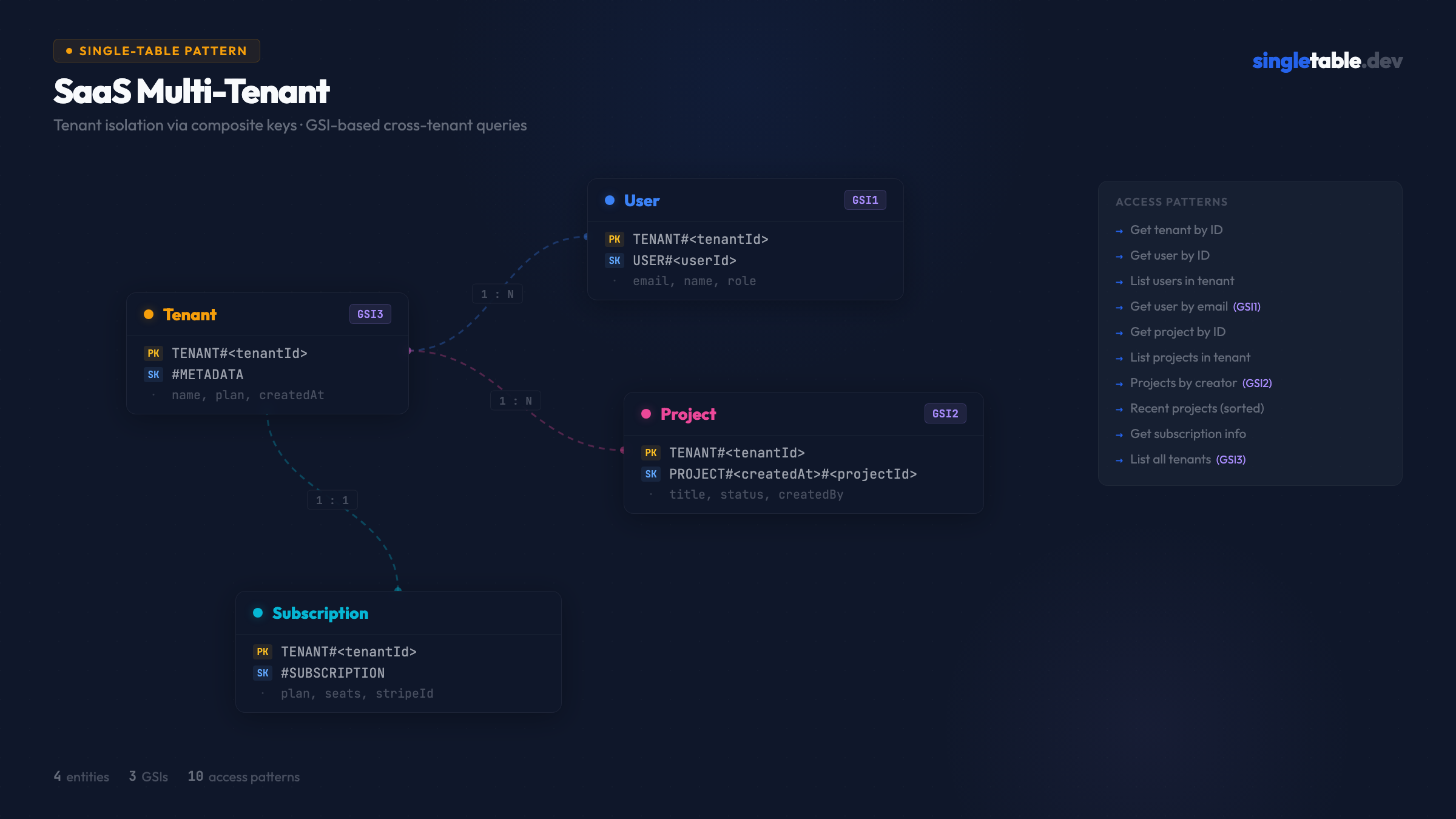
Table design
Primary key structure
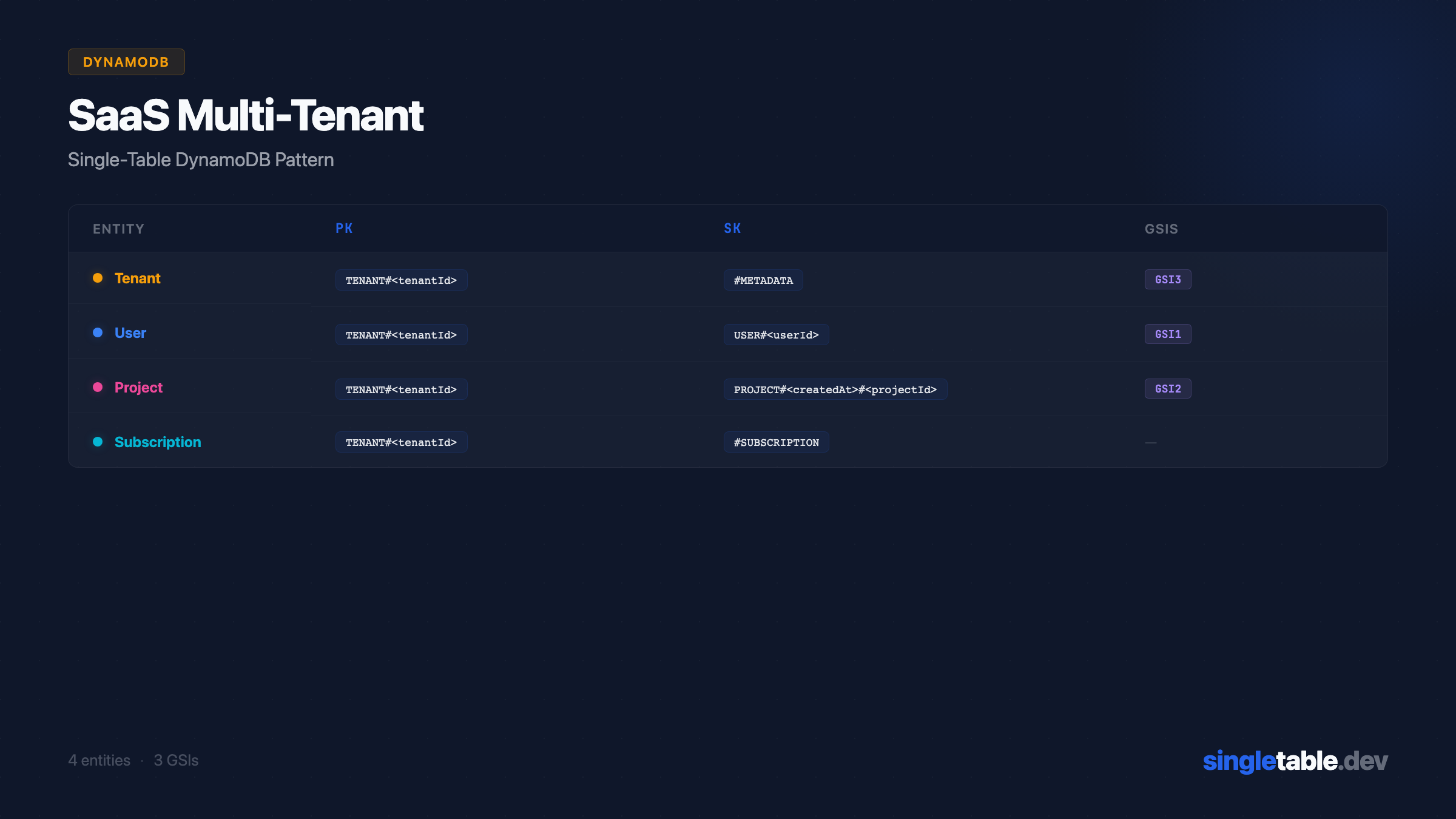
| Entity | PK | SK | Purpose |
|---|---|---|---|
| Tenant | TENANT#<tenantId> | #METADATA | Tenant base record |
| Subscription | TENANT#<tenantId> | #SUBSCRIPTION | Billing info (same partition as tenant) |
| User | TENANT#<tenantId> | USER#<userId> | User within tenant |
| Project | TENANT#<tenantId> | PROJECT#<createdAt>#<projectId> | Project within tenant, sorted by creation date |
Tenant and Subscription share a partition: fetching tenant info and billing is a single Query on TENANT#<tenantId> with no GSI needed. AP1 and AP9 are covered by the same key. Users in the tenant partition means “list all users” (AP3) is a Query with SK begins_with("USER#"). Projects in the tenant partition, sorted by createdAt prefix in the SK, means AP6 and AP8 both come from the same partition query. Getting any entity by ID (AP1, AP2, AP5) uses GetItem with the full composite key.
GSI design
| GSI | PK | SK | Purpose |
|---|---|---|---|
| GSI1 | USER_EMAIL#<email> | USER#<userId> | Look up user by email (login flow) |
| GSI2 | USER#<userId> | PROJECT#<createdAt>#<projectId> | List projects by creator |
| GSI3 | TENANT_LIST | <tenantName>#<tenantId> | List all tenants (admin view) |
GSI1 covers AP4 - the login flow where you have an email and need the user record. This is a common pattern: use the primary table for tenant-scoped access and a GSI for cross-tenant lookups like authentication.
GSI2 covers AP7 - “show me my projects.” The PK is the user’s ID, and the SK sorts projects by creation date.
GSI3 covers AP10 - admin listing of all tenants. The static PK TENANT_LIST collects all tenants into one partition, sorted by name. This is the “list” GSI pattern - useful when you need to enumerate all items of a given entity type.
Sample data
Here’s what the table looks like with real data:
| pk | sk | gsi1pk | gsi1sk | gsi2pk | gsi2sk | gsi3pk | gsi3sk | Entity Data |
|---|---|---|---|---|---|---|---|---|
TENANT#t_01 | #METADATA | - | - | - | - | TENANT_LIST | Acme Corp#t_01 | {name: "Acme Corp", plan: "pro", ...} |
TENANT#t_01 | #SUBSCRIPTION | - | - | - | - | - | - | {plan: "pro", seats: 10, stripeId: "cus_...", ...} |
TENANT#t_01 | PROJECT#2026-02-01#p_01 | - | - | USER#u_01 | PROJECT#2026-02-01#p_01 | - | - | {title: "Q1 Roadmap", status: "active", ...} |
TENANT#t_01 | PROJECT#2026-02-10#p_02 | - | - | USER#u_02 | PROJECT#2026-02-10#p_02 | - | - | {title: "API Redesign", status: "draft", ...} |
TENANT#t_01 | USER#u_01 | USER_EMAIL#alice@acme.com | USER#u_01 | - | - | - | - | {name: "Alice", role: "admin", ...} |
TENANT#t_01 | USER#u_02 | USER_EMAIL#bob@acme.com | USER#u_02 | - | - | - | - | {name: "Bob", role: "member", ...} |
TENANT#t_02 | #METADATA | - | - | - | - | TENANT_LIST | Globex Inc#t_02 | {name: "Globex Inc", plan: "free", ...} |
Notice how all of Acme Corp’s data - tenant metadata, subscription, users, and projects - lives in a single partition. A query on pk = TENANT#t_01 with no SK filter retrieves the entire tenant in one call. In practice you’d scope it with SK conditions, but the option to fetch everything is powerful for exports and migrations.
Resolving each access pattern
AP1 - Get tenant by ID:
GetItem(pk=TENANT#t_01, sk=#METADATA)One read, O(1).
AP2 - Get user by ID:
GetItem(pk=TENANT#t_01, sk=USER#u_01)One read. Requires tenantId - which you always have in an authenticated request.
AP3 - List all users in a tenant:
Query(pk=TENANT#t_01, sk begins_with USER#)One query. Returns all users in the tenant, sorted by userId.
AP4 - Get user by email (login):
Query(GSI1, gsi1pk=USER_EMAIL#alice@acme.com)One query on GSI1. This is a cross-tenant lookup - the only one in this schema. Used exclusively in the login flow.
AP5 - Get project by ID:
GetItem(pk=TENANT#t_01, sk=PROJECT#2026-02-01#p_01)One read - but the SK requires createdAt. If you only have a projectId, you can’t construct the key directly. Two options: store createdAt alongside the ID everywhere you reference it, or keep a separate lookup record (PROJECT#<id> / #METADATA) like the order duplication pattern. Most apps store createdAt in the project reference, so this is rarely a problem in practice. A cleaner fix is using ULIDs as project IDs - the timestamp is embedded in the ID, so SK: PROJECT#<ulid> gives you both chronological ordering and direct lookup.
AP6 - List all projects in a tenant:
Query(pk=TENANT#t_01, sk begins_with PROJECT#)One query. Returns all projects, sorted chronologically because createdAt is the SK prefix.
AP7 - List projects by creator:
Query(GSI2, gsi2pk=USER#u_01, ScanIndexForward=false)One query on GSI2, sorted newest-first.
AP8 - List recent projects in a tenant:
Query(pk=TENANT#t_01, sk begins_with PROJECT#, ScanIndexForward=false)Same as AP6, reversed. The createdAt prefix in the SK makes this work without a GSI.
AP9 - Get tenant subscription/billing info:
GetItem(pk=TENANT#t_01, sk=#SUBSCRIPTION)One read. Or fetch both tenant metadata and subscription in one call:
Query(pk=TENANT#t_01, sk begins_with #)Returns #METADATA and #SUBSCRIPTION together - useful for billing pages that need both.
AP10 - List all tenants (admin):
Query(GSI3, gsi3pk=TENANT_LIST)One query. Returns all tenants sorted alphabetically by name (because the SK is <name>#<tenantId>).
ElectroDB entity definitions
Here’s how this schema looks in ElectroDB, the library I use in production:
export const TenantEntity = new Entity({
  model: {
    entity: "tenant",
    version: "1",
    service: "saas",
  },
  attributes: {
    tenantId: { type: "string", required: true },
    name: { type: "string", required: true },
    plan: {
      type: "string",
      required: true,
      default: "free",
    },
    createdAt: {
      type: "string",
      required: true,
      default: () => new Date().toISOString(),
      readOnly: true,
    },
    updatedAt: {
      type: "string",
      required: true,
      default: () => new Date().toISOString(),
      set: () => new Date().toISOString(),
      watch: "*",
    },
  },
  indexes: {
    primary: {
      pk: {
        field: "pk",
        composite: ["tenantId"],
        template: "TENANT#${tenantId}",
      },
      sk: {
        field: "sk",
        composite: [],
        template: "#METADATA",
      },
    },
    list: {
      index: "gsi3",
      pk: {
        field: "gsi3pk",
        composite: [],
        template: "TENANT_LIST",
      },
      sk: {
        field: "gsi3sk",
        composite: ["name", "tenantId"],
        template: "${name}#${tenantId}",
      },
    },
  },
}, { client, table });Why this design
Putting all tenant data under TENANT#<id> means a single query can fetch users, projects, and metadata together. The downside: if a tenant has 100,000 projects, that partition gets hot - one of the five most common single-table design mistakes. For most SaaS apps this isn’t an issue - DynamoDB partitions can handle 3,000 RCUs and 1,000 WCUs per second. If you’re building the next Notion, you’d want to split projects into their own partition.
The PROJECT#<createdAt>#<projectId> SK gives chronological ordering naturally. If you need to sort by title or status instead, you’d need another GSI. I’m optimizing for the most common access pattern: “show me recent projects.”
The TENANT_LIST GSI partition is a known hot-key pattern - all tenants write to the same partition key. Fine for admin views with low read volume. If you need high-throughput tenant enumeration (unlikely), use a Scan instead.
Cross-tenant email lookup is essential for login flows but infrequent compared to tenant-scoped queries. A dedicated GSI is the right call - it’s clean and doesn’t pollute other indexes.
For production, I’d also add: an audit trail entity with SK pattern AUDIT#<timestamp>#<eventId> in the tenant partition; an invitation entity for pending team invites with a GSI on the invited email; and an API key entity stored in the tenant partition with a cross-tenant GSI for key lookup during request authentication.
Production optimization: overloaded GSIs
The design above uses three dedicated GSIs - one per cross-partition query. That’s deliberate for clarity. But in production, you’re paying for each GSI: every write to the base table is replicated to every GSI. Three GSIs means 3x write amplification.
Look at the GSI partition keys:
| GSI | Entity | PK Pattern |
|---|---|---|
| GSI1 | User | USER_EMAIL#<email> |
| GSI2 | Project | USER#<createdBy> |
| GSI3 | Tenant | TENANT_LIST |
These prefixes never collide. That means all three can share a single overloaded GSI:
| Entity | gsi1pk | gsi1sk | Purpose |
|---|---|---|---|
| User | USER_EMAIL#<email> | USER#<userId> | Login by email |
| Project | USER#<createdBy> | PROJECT#<createdAt>#<projectId> | Projects by creator |
| Tenant | TENANT_LIST | <name>#<tenantId> | Admin tenant listing |
One GSI. Same ten access patterns. One-third the write cost.
Here’s what changes in ElectroDB - every entity’s secondary index points to gsi1 instead of its own dedicated GSI:
// Tenant - list index moves from gsi3 to gsi1
list: {
  index: "gsi1",
  pk: {
    field: "gsi1pk",
    composite: [],
    template: "TENANT_LIST",
  },
  sk: {
    field: "gsi1sk",
    composite: ["name", "tenantId"],
    template: "${name}#${tenantId}",
  },
},ElectroDB handles the overloading transparently - each entity writes its own key pattern to the shared gsi1pk/gsi1sk fields, and queries scope to the right items automatically because the PK prefixes are unique.
Overload when you’re optimizing for cost and your team understands the pattern - this is the standard approach for production single-table designs. Keep separate when you’re prototyping, when different GSIs need different projection types (ALL vs KEYS_ONLY), or when you want to independently manage throughput per access pattern.
For this schema, I’d overload from day one. The prefixes are clean, there’s no overlap risk, and cutting from 3 GSIs to 1 saves real money at scale.
Refinement: ULID sort keys for projects
The PROJECT#<createdAt>#<projectId> pattern works, but it has a rough edge: AP5 (get project by ID) requires knowing createdAt to construct the sort key. If you only have a projectId - from a URL param, a foreign key reference, a notification payload - you can’t do a direct GetItem. You either store createdAt redundantly everywhere you reference the project, or you add a lookup GSI. Neither is clean.
ULIDs eliminate this entirely. A ULID encodes a millisecond-precision timestamp in its first 10 characters and is lexicographically sortable by time. Replace the two-part key with a single ULID:
| Entity | Old SK | New SK |
|---|---|---|
| Project | PROJECT#<createdAt>#<projectId> | PROJECT#<ulid> |
All ten access patterns still work:
- AP5 (get by ID):
GetItem(pk=TENANT#t_01, sk=PROJECT#<ulid>)- nocreatedAtneeded, the ID is the key - AP6 (list all projects):
Query(pk=TENANT#t_01, sk begins_with PROJECT#)- results are chronological because ULID ordering = time ordering - AP7 (projects by creator):
Query(GSI2, gsi2pk=USER#u_01)- same query, SK composite just changes fromcreatedAt+projectIdtoprojectId - AP8 (recent projects):
Query(..., ScanIndexForward=false)- still works identically
Here’s the updated Project entity in ElectroDB:
import { ulid } from "ulidx"

export const ProjectEntity = new Entity({
  model: { entity: "project", version: "1", service: "saas" },
  attributes: {
    tenantId: { type: "string", required: true },
    projectId: {
      type: "string",
      required: true,
      default: () => ulid(), // timestamp-embedded, lexicographically sortable
    },
    title: { type: "string", required: true },
    status: { type: "string", required: true, default: "active" },
    createdBy: { type: "string", required: true },
    createdAt: {
      type: "string",
      required: true,
      default: () => new Date().toISOString(),
      readOnly: true,
    },
    updatedAt: {
      type: "string",
      required: true,
      default: () => new Date().toISOString(),
      set: () => new Date().toISOString(),
      watch: "*",
    },
  },
  indexes: {
    primary: {
      pk: {
        field: "pk",
        composite: ["tenantId"],
        template: "TENANT#${tenantId}",
      },
      sk: {
        field: "sk",
        composite: ["projectId"],
        template: "PROJECT#${projectId}", // one field, not two
      },
    },
    byCreator: {
      index: "gsi2", // or gsi1 if using overloaded GSIs
      pk: {
        field: "gsi2pk",
        composite: ["createdBy"],
        template: "USER#${createdBy}",
      },
      sk: {
        field: "gsi2sk",
        composite: ["projectId"],
        template: "PROJECT#${projectId}",
      },
    },
  },
}, { client, table })
Keep createdAt as an attribute for display and filtering - just don’t put it in the key. The chronological ordering comes from the ULID itself.
Use this for new tables, always. The two-part <timestamp>#<id> key is a common DynamoDB pattern but it’s strictly worse than ULIDs: more complex keys, harder direct lookups, no benefit that ULID doesn’t also provide. See ULID vs UUID as DynamoDB Sort Keys for the full comparison.
Design this visually → coming soon
Imagine dragging these four entities onto a canvas, drawing the GSI connections, and seeing the sample data table update in real time. That’s what I’m building at singletable.dev.
Pattern #1 of 10 in the SingleTable pattern library.